For American Airlines Flight Attendants

Every answer.
One platform.

Galley Desk is the all-in-one FA toolkit. An AI concierge that knows your contract, your schedule and your seniority, backed by tools built for every question you face on the line: bidding, pay, open time, legality, hotels and layovers. Every AA base is supported.

Galley Desk · AI Concierge
Can scheduling call me during my rest at a layover?
✦ Concierge · Contract Help Layover rest is protected under the CBA. Once you are released at the layover hotel, Crew Scheduling cannot contact you during your rest period (Section 11.J.1).
→ Open Contract Help
What does trip 8102 pay me?
✦ Concierge · Pay At your rate of $87.04 an hour: $1,305.60 flight pay, $153.05 per diem and $116.05 boarding pay, about $1,574.70 before taxes. It lands on your November 15 check.
→ Open Pay Calculator
The Galley Desk App Beta

Your schedule,
always current.

The Galley Desk phone app reads your own schedule from AA after every pickup, drop and trade, then puts everything about each trip in one place. You sign in on American Airlines' own page, and your AA login never reaches Galley Desk.

Live schedule and pay
Trips sync from AA on their own. See what changed since your last sync and what it did to your settlement and advance checks.
Every trip, in detail
Legs, sit times, exact aircraft, layover hotel and shuttle numbers, and the crew on each flight, kept only on your phone.
Open time and red flags
Live open trips priced at your rate, and a notification when a red flag trip that fits you opens. The app checks every time you open it.
Friends on layovers
Invite your crew friends, see when you share a city and a night, message each other, and ask to fly a trip together. You choose what each friend sees.
Logbook and CrewSpots
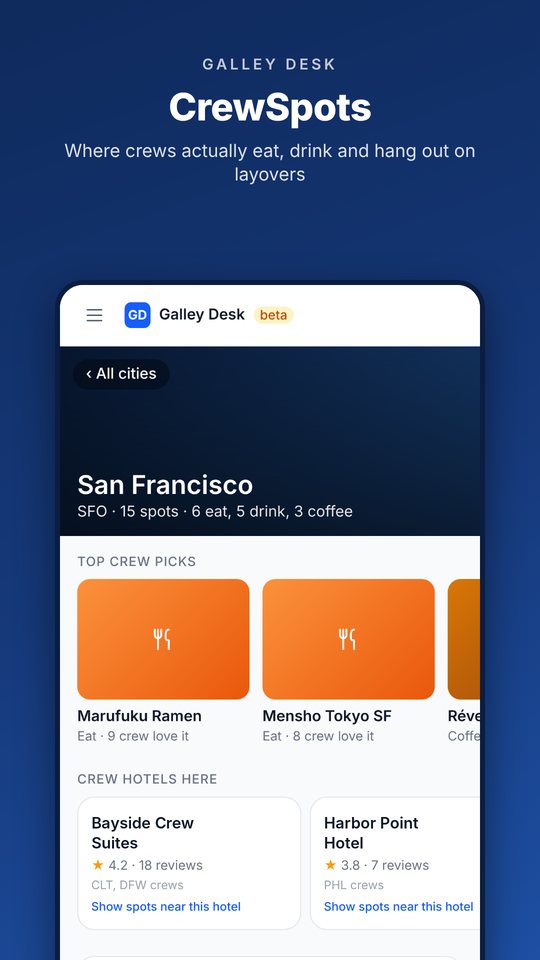
Your miles, block hours and places flown, plus where crews eat, drink and unwind on every layover.
Home, your way
Your most used tools one tap away. Rearrange Home or hide what you never use, and it follows you to every device.

iPhone

  1. Install TestFlight from the App Store
  2. Open the invite and tap Install
  3. Sign in with your Galley Desk account
Get the iPhone beta →

Android TESTERS WANTED

  1. Join the tester group with the Google account on your phone
  2. Tap Become a tester, then install from Google Play
  3. Sign in with your Galley Desk account
Become a tester →

The app is free with a Galley Desk membership. Not a member yet? Start here.

Screenshots are from a demo account. Names, employee numbers, crew and hotels shown are made up, and any resemblance to real people or hotels is coincidental.
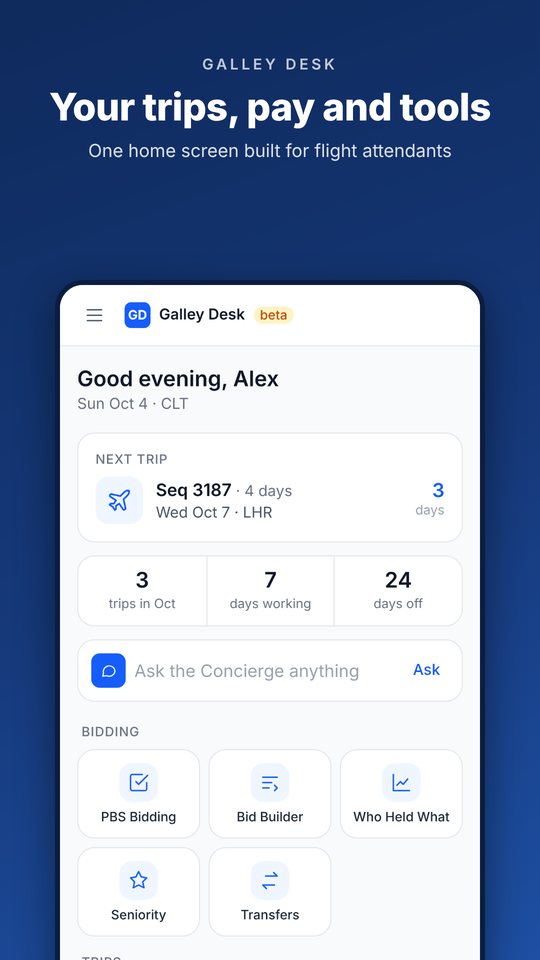
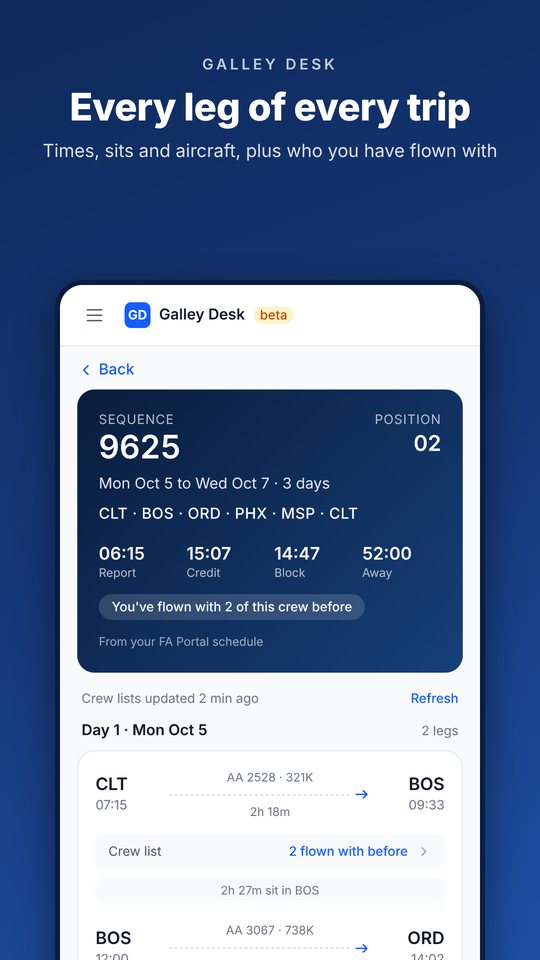
Galley Desk app home screen Trip details with layover hotel and crew CrewSpots for a layover city
The AI Concierge

Ask anything.
Get routed intelligently.

You should not have to know which tool to open. Ask in plain English and the concierge either answers directly, worked out for you, or hands you the right tool with your details already loaded.

Contract Question
"Can scheduling call me during my rest at a layover?"
→ Contract Help
Trip Pay
"What does trip 8102 pay me, and when do I get paid for it?"
→ Pay Calculator
Extension Pay
"If my trip runs late, when does extension pay kick in?"
→ Contract Help
Duty Day Check
"Signed in at 0600 in CLT, last leg is 1:35. When do we have to close the door?"
→ Duty Day Calc
Concierge · Contract Help
One AI. Full context. The concierge knows your seniority, your base, your pay rate, your current bid period and your contract, so every answer is about you, not a generic policy summary.
The Tool Suite

Built for every
question on the line.

Every tool below is live, with more in active development. One subscription covers everything: current tools, new tools and every update. Tap See it on any tool to look at the real screens.

✦
Live Now
PBS Bid Intelligence
Stop guessing what you can hold. 3.7 million award records across all 10 AA bases and four years of PBS history, turned into a seniority-aware bidding engine.
  • Hold chances on every trip in the packet, judged at your seniority: very likely, usually holds, coin flip or long shot
  • Browse with the full PBS filter set: layover city, trip length, report and release times, credit, aircraft, landings and more
  • Every card shows trip value and dollars per hour away; every trip shows hotels, legs and positions
  • After awards: how junior the trip went in the 2300 TTS run and how often it changed hands
  • Mock Bid runs your seven layers the way PBS would
☰
Live Now
Bid Builder
Tell it what you want from the month and it builds a full layered PBS bid around your seniority, with every trip rated by how likely you are to hold it.
  • Pick a goal (balanced, most days off, low time, high time, commuter or better trips), then set days off, trip lengths, cities and positions
  • Each trip is rated from who actually got it, matched on the trip's flights since sequence numbers change every month
  • A projected month plus all seven PBS layers, from dream trips down to a safety net, ready to type in
  • Send it to Mock Bid in one tap
⧉
Live Now
Buddy Bid
Want to fly the month with your crew? See the trips you can all hold together, judged at the most junior member, which is the seniority PBS uses to award a group.
  • Add up to three buddies by employee number
  • Every trip shows whether your group held it, judged at the most junior member
  • Built on real award data, not a guess
  • Ask about buddy bidding and get the rules straight from the PBS guide
◈
Live Now
Contract Help
The CBA runs hundreds of pages and nobody has it memorized. Ask anything in plain English and get a direct answer that cites the section it comes from.
  • Rest, reserve, extensions and scheduling contact rules
  • Pay questions worked out at your own rate, including when it lands on your check
  • Sick leave, vacation, leaves and pay protection
  • Gets better every week from real questions crews ask
◎
Live Now
Duty Day Checker
Before you pick up that trip or get asked to extend, know exactly where you stand. Ask the concierge or use the full calculator.
  • When the aircraft door has to close
  • Scheduled and operational max release from your sign-in window
  • When 200% and 300% extension pay start
  • Domestic and international limits
⇄
Live Now
Double-Up Check
Thinking about flying two sequences back to back? Check the combined duty day against the contract before you pick it up.
  • Enter two sequence numbers and the day
  • Checks the CBA double-up limits: 14:00 scheduled, 15:00 actual domestic, 16:00 actual NIPD and IPD
  • Flags a gap between trips that is too short
  • Shows the full window from first report to final release
⬢
Live Now
Pay Calculator
Credit hours and actual pay are not the same thing. See what a sequence pays before you bid it, project a month from your HI-1, or paste a pay statement for a plain-English breakdown.
  • Sequence lookup fills in trip pay, TAFB, aircraft, trip type and legs
  • Position premiums, international premium, boarding pay and per diem included
  • Red flag, holiday and incentive day premiums
  • Estimated take-home, which you can calibrate to your real checks
  • Paystub Explainer breaks down any AA pay statement line by line
▤
Live Now
My Schedule & Pay
Your trips on a calendar, kept current from AA, with what your settlement and advance checks should look like.
  • Syncs from AA after every pickup, drop and trade (phone app or Chrome connector)
  • Shows what changed since your last sync and what it did to your pay
  • What's a trip worth to me? prices a pickup or drop against your checks
  • Upload one pay statement and your take-home matches your real deposits
  • A page for every trip with legs, hotel, shuttle and CrewSpots
◉
Beta
Open Time
Live open time from your own TTS sign-in, priced at your rate, plus a look at how open time really gets covered at every base.
  • What each open trip pays you and what it adds to your check; red flag trips shown at 150%
  • Patterns: when UBL awards land, how fast trips fill, which days move, and how junior trips go
  • Who got it: UBL awards on any day by seniority only, next to your own requests
  • Works in the phone app, or on a computer with the Chrome connector
⚑
New
Red Flag Alerts
Red flags only post for trips starting today or tomorrow, and they go fast. Get a notification when one that fits you opens.
  • Pick today only or today and tomorrow, the longest trip you want, positions and layover cities
  • Shows when red flags usually open at your base and how fast they get picked up
  • The phone app checks each time you open it; the Chrome connector checks every 5 minutes
  • Runs on your own TTS sign-in, never anyone else's
✉︎
Beta
Trade Board Alerts
Stop refreshing the trade board. Tell it what you are looking for and get alerted when it posts.
  • Alerts by layover city, dates, base and position
  • Choose drops, trades, pickups or any post
  • Pause or check any alert on demand
⚖︎
Live Now
Transfer Explorer
Thinking about a base transfer? See what your seniority could hold at every base, broken out by trip type. Real award data, not guesswork.
  • All ten bases side by side: BOS, CLT, DCA, DFW, LAX, LGA, MIA, ORD, PHL, PHX
  • Holdable trips by type: IPD, NIPD, red-eye, pink-eye, ODAN, turns and domestic
  • The cutoff at each base and how many trips fall inside it
  • Answers "could I actually hold the trips I want there?" before you commit
☯︎
Live Now
Who Held What
Pull up any trip on a specific day and see the seniority that actually flew it, position by position. Sanity-check whether a trip is realistic for your number.
  • Search by flight number, sequence or layover city, at every base
  • Seniority number and years of service for each position, never names
  • Speaker and purser views
  • Four years of award history
▲
Live Now
Seniority
Your seniority data, made useful. See how you moved on the latest list, check your gap from a buddy, and watch how the FA workforce is shifting between bases.
  • Your movement: system and base rank change from the prior list
  • Buddy bid gap: enter a buddy's employee number and see your base rank difference
  • Latest list change with per-base before and after counts
  • Updates every time AA publishes a new seniority list
▩
Live Now
Seq Hotels & Reviews
Looking at a trade or a pickup? Pull up the layover hotels, layover length and transport for any sequence in seconds, with ratings from crews who stayed there.
  • Look up by sequence number or by city
  • Hotel and transport for every layover, with phone numbers
  • Crew ratings for quiet, cleanliness, the bed, food and transport
  • Rate a hotel after you fly it, so the next crew knows
⏱︎
Live Now
Reserve Life
Reserve rules, calculated and cited from the CBA.
  • Days off for the month, split into Golden and Flex, with vacation proration worked out
  • Pay and guarantee, availability and legality, and bid strategy
  • Legal Pattern Checker flags patterning problems in your line
  • Every answer cites the contract section it comes from
❖
Live Now
Galley Service Flows
Walk into any galley knowing the flow. Step-by-step service flows for galley positions, contributed by the flight attendants who actually work them.
  • Guided step-by-step mode or a tap-to-check checklist
  • Find a flow by sequence number, or by aircraft and position
  • Compare how different crews run the same position
  • Meant to complement, never replace, the IDS Service Manual in Comply365
▦
Live Now
Service Tracker
Your premium cabin service, organized at a glance. A seat map that tracks predeparture drinks, meal choices and in-flight orders seat by seat, with a live count of what is left.
  • Business and First seat maps across the fleet
  • Load your entrees and pre-orders, then tap a seat to set the meal, drinks and notes
  • Live meal count, so you know when every seat is covered
  • Stays on your device unless you choose to sync it or share it with a crewmate
⚲
Live Now
Logbook
Your whole career in numbers, imported from your own AA history in one paste.
  • Miles flown, block hours, days in the air and nights in a hotel
  • Route map of everywhere you have worked
  • Year by year totals, top destinations and personal records
★
Live Now
CrewSpots
Where crews actually eat, drink and unwind on layovers, shared by flight attendants.
  • A page for every layover city with the top crew picks
  • What is walkable from your hotel, on a list or a map
  • Filter by eat, drink, coffee, fitness and more
  • Add your own favorites and photos for the next crew
♡
Live Now
Friends & Messages
See when your crew friends will be in the same city on the same night, and plan from there.
  • Invite only, and you choose what each friend sees: hidden, city, city and hotel, or your full schedule
  • Days you are both off and trips you share
  • Message each other and ask to fly a trip together
  • Ghost mode and per-trip hiding anytime
The Tour

Every screen.
Nothing hidden.

These are real screens from the app, captured on a demo account. Pick an area, swipe through, and tap any screen to see it up close.

Every trip in your base's packet, judged at your seniority from real award history, then built into a full PBS bid.

Who actually held what, at every base, going back four years. Seniority numbers only, never names.

Live open time from your own TTS sign-in, red flag alerts, and a clear look at how open time really gets covered.

Your schedule kept current from AA, a page for every trip, and what your checks should look like.

Ask in plain English and get an answer worked out for you, with the contract section it comes from.

Friends on the same layover, hotel reviews from crews, and where crews actually go.

Built for the people working the galley and the cabin.

Screenshots are from a demo account. Names, employee numbers, crew, messages and hotels shown are made up, and any resemblance to real people or hotels is coincidental. Trip and seniority figures come from AA bid packets and award history and are shown without names.
How It Works

One platform.
Fully connected.

The concierge is not a chatbot bolted onto separate tools. It is the layer that ties everything together: it knows your profile, your question, and which tool has the answer.

1
You Ask Anything
Type your question in plain English: contract, bidding, pay or legality. No need to know which tool to open or which section applies.
2
Concierge Triages
It works out what you need, checks your profile (seniority, base, pay rate and current bid period) and either answers directly or routes you to the right tool.
3
Tool Opens in Context
When a specialized tool is the right answer, it opens with your details already loaded. No re-entering information. No starting from scratch.
4
You Get a Real Answer
Grounded in your actual contract, your actual seniority and real bid data. Not generic guidance, but answers that apply to your situation.
Pricing

Less than a coffee.
Worth every trip.

One plan, billed monthly or yearly. Full access to everything. Cancel anytime.

By subscribing you agree to our Terms of Service and Privacy Policy.

FA-Only Access

Verified at the roster level.

FAs are careful about who has their info and why. Here is exactly how access works, with no fine print.

Step 1
Personal Email
You sign up with any personal email of your choice. This becomes your Galley Desk login. No AA systems are involved at this step.
Step 2
AA Email Verification
We send a verification code to your @aa.com address to confirm you are an active AA employee. You enter the code to proceed.
Step 3
Roster Check
You enter your AA employee number, which is cross-referenced against the seniority roster, information every FA already has access to. Verified FAs only. No exceptions.
Where does the data come from? Everything powering this platform is information every AA flight attendant already has access to: bid packets, award history and the seniority list, organized into a useful format and made available only to other verified FAs. Your own schedule and open time are read only from your own AA sign-in, on your own phone or computer, and are never shared with other flight attendants. No outside parties. No third-party data sources.
FAQ

Questions answered.

Is this affiliated with American Airlines or APFA?
No. Galley Desk is an independent tool built by an AA flight attendant. It is not affiliated with, endorsed by, or connected to American Airlines, Inc. or the Association of Professional Flight Attendants.
Where does the data come from?
Bid packets, award history and the seniority list, which every AA flight attendant already has access to. They are organized here and made available only to other verified FAs. Your own schedule and open time come from your own AA sign-in and are never shared with anyone else.
Does Galley Desk see my AA password?
No. In the phone app you sign in on American Airlines' own page, and on a computer you sign in to AA in your own Chrome browser as usual. Your AA username, password and codes go only to American Airlines, and your AA sign-in stays on your device. Galley Desk only reads your own information, and it never picks up, drops or trades trips for you.
How does verification work?
You sign up with a personal email, then verify your AA employment by entering a code we send to your @aa.com address. Finally, you enter your employee number, which is cross-referenced against the seniority roster to confirm you are an active FA. Your @aa.com address is not retained after verification. Your employee number and seniority profile are stored to power your personalized bidding tools.
What bases are supported?
All 10 AA flight attendant bases: CLT, DFW, MIA, LGA, PHL, ORD, LAX, PHX, DCA and BOS. Sign up from any base and your seniority, base rank and bid data load automatically.
Is there a phone app?
Yes. The Galley Desk app is in beta for iPhone (through TestFlight) and Android (Google Play testing), and it is included with your membership. Everything also works in your phone's browser at app.galleydesk.com. See the app section to get it.
Can I cancel anytime?
Yes. Cancel from your account settings at any time. You will not be charged again and you keep access through the end of your current billing cycle.
How does pricing work?
Galley Desk is $8.99 / month or $79 / year for new signups. Members who subscribed on or before May 31, 2026 stay at $6.99 / month as long as the subscription stays active. If you cancel and later resubscribe, you sign up at the current rate.
Is my personal data safe?
We keep only what the tools need: your login email, employee number and seniority profile, your subscription status, and anything you choose to add, such as your synced schedule, pay figures, profile, friends and messages. Crew lists stay on your phone. Data is encrypted at rest and in transit, and we never sell it. See our Privacy Policy for the full picture.
How current is the bid data?
The current bid packet is loaded for all 10 bases. Award history goes back four years, over 3.7 million records, and powers hold chances, Bid Builder, Transfer Explorer and Who Held What. Data is refreshed every month when new packets and awards are published.